I made a website! I built it originally using HTML and JavaScript and it’s not much to look at yet. Part of my job is to review portfolio websites, and I was tasked with writing an article to give tips for beginners that want to make a personal site. What better way to prepare than to try it myself, right? I made a lot of mistakes but am happy with how it ended up.
As someone who doesn’t know when to walk away and has a final project for my programming course coming up, I have decided to completely redo it using a framework called React. What is a framework you ask? It’s basically when people who are really good at what they do and work at places like Twitter or Facebook have a standard way of organizing code, and make this free and publicly available for everyone to use.
This concept is what all programming languages are built on and how they evolve. Keywords that make something happen when using the languages themselves are just standardized functions that someone else has built into the program. A function is basically just a math concept. You put something in, do a mathematical operation or a series of mathematical operations, and get something else out. For example, one of the first things we did for my course was complete challenges using a language called Python. One challenge was to create a ‘Caesar Cipher.’
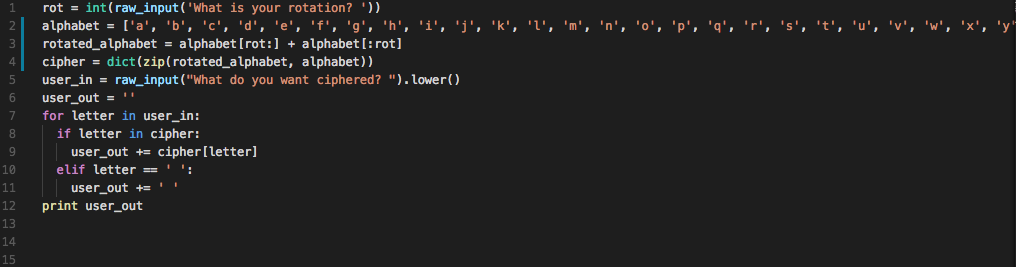
Allegedly originally used by Julius Caesar to send messages, it’s a straightforward encryption technique that shifts the letter of the alphabet. If you want to shift (or rotate) the alphabet by 3, A becomes D, B becomes E, C becomes F, and so on. For example, an encrypted version of ‘hello’ with a rotation of 3 becomes ‘khoor.’ I was tasked with decrypting a message with a known rotation, the solution to which is below.

Line 1
I prompt the user to give me the rotation for their encrypted message by setting a variable that I declared ‘rot’ equal to ‘raw_input,’ which is what tells the computer to ask ‘What is your rotation?’ when the code is run. All I knew what that I needed to use the right keyword, ‘raw_input,’ and the computer will do the rest of the work. This is using a standardized function that someone has already built and is now a part of Python. ‘int’ is another keyword used to call a function that someone else has built into Python. It takes the user input as a number instead of a letter. Basically, it tells the computer to take the input as something it can do math with.
Line 2
I save the alphabet as the variable alphabet.
Line 3
I create a rotated version of the alphabet and save it as the variable rotated_alphabet using the two previous lines of code. I’m telling the computer to create a new alphabet from alphabet, starting at whatever number rot is, and going to the end of alphabet. Then, I add the beginning of alphabet until the whatever number rot is. For example, if rot = 3, alphabet[rot:] is the part of alphabet starting at d and going to z, then adds a, b, c as the end so that:
rotated_alphabet = [‘d’, ‘e’, ‘f’, ‘g’, ‘h’, ‘i’, ‘j’, ‘k’, ‘l’, ‘m’, ‘n’, ‘o’, ‘p’, ‘q’, ‘r’, ‘s’, ‘t’, ‘u’, ‘v’, ‘w’, ‘x’, ‘y’, ‘z’,’a’, ‘b’, ‘c’]
Side note: It starts at d and not c because computers start counting from zero. One of the many small confusing things that make up all of development.
Line 4
I create a “dictionary” using the keywords ‘dict’ and ‘zip.’ This is my decryption key. It matches each rotated letter to the corresponding letter position in the regular alphabet. Matching K to H, H to E, O to L, and O to R so that ‘khoor’ becomes ‘hello.’ This is all saved as the variable cipher.
Line 5
I use the same keyword as earlier, ‘raw_input’ that again asks the user to input something to the computer. This time I ask for the phrase, using my example I would enter ‘khoor’. I use the keyword ‘.lower()’ to change all input to lowercase, so that I can match it to the alphabet I created in line 2. The computer won’t recognize an A as an a. Whatever the user enters gets saved as the variable user_in.
Line 6
I create a variable ‘user_out’ which is saved as an empty string. A string is a type of data, different from int for example, and is basically just how a computer stores characters, such as letters, and doesn’t try to do things like math with them.
Line 7
I use the keywords ‘for’ and ‘in’ to go through each letter in user_in.
Line 8
If the letter is in my cipher key, do the thing on line 9. This means that if there is a number or symbol, my code will ignore it.
Line 9
The rotated letter is in my cipher dictionary, so I want to add the regular alphabet letter to my user_out variable.
Line 10
I use the keyword ‘elseif.’ The code is going through each character in user_in. If it doesn’t find it in my dictionary, it skips line 9 and isn’t added to user_out. This includes spaces. ‘elseif’ says that if the character is a space do the thing on line 11.
Line 11
Adds a space to user_out every time there is a space in user_in.
Line 12
I use the keyword ‘print’ to return my variable ‘user_out’ to the console. In this case, it would return ‘hello’
And that’s it! Going through line by line, it’s easy to see that all I am doing is creating variables and using the keywords that I need. This is a tiny example of a simple function, but this concept scales up in a big way. You can see that the more you are able to use keywords and build off of what people have already done, the easier it is to do more powerful things using more complex functions.
You can check out the vanilla JavaScript version of my website here, with the React version coming soon!
Leave a Reply